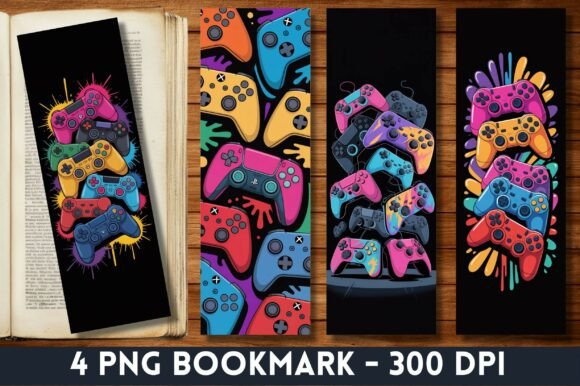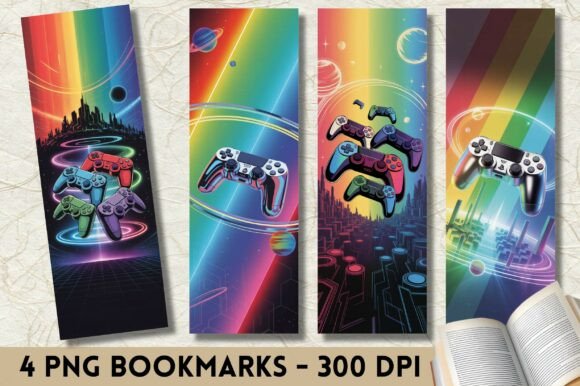
Vibrant Paint Gaming Controller Bookmark: A Digital Asset for Creative Workflows and Marketing
Bookmarks have long served as simple placeholders, but in the hands of creators, marketers, and small business owners, they become something far more versatile. The Vibrant Paint Gaming Controller Bookmark transforms a functional accessory into a vibrant design asset that fits across multiple workflows. Whether you are promoting your latest release, assembling a unique gift, or adding visual interest to a craft project, this digital bookmark delivers both form and function in a compact format.
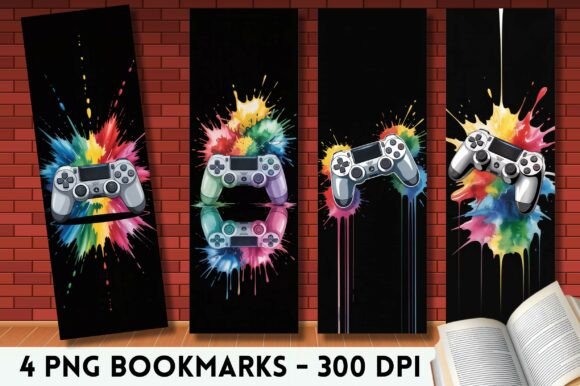
Each set includes four PNG files, each measuring 2 inches by 6 inches, with a resolution of 600 by 1800 pixels at 300 dots per inch. That resolution matters. At 300 dpi, the artwork holds sharp edges, smooth gradients, and consistent color density whether you print it at home or send it to a professional printer. The gaming controller motif, rendered in vivid paint-style strokes, gives the design a playful energy that appeals to gamers, streamers, educators, and anyone who works with playful or interactive content.
Because the files are digital only, you retain full control over how and when you use them. There are no minimum order quantities, no shipping delays, and no inventory to manage. You download, you use, you repeat as needed. That flexibility makes this bookmark a practical addition to a wide range of planning and execution processes.
Where the Vibrant Paint Gaming Controller Bookmark Fits in a Broader Workflow
Integrating a digital bookmark into your workflow depends on what you are trying to achieve. For some, the bookmark appears at the beginning of a project as a design seed. For others, it enters during the marketing phase as a promotional giveaway. And for many, it becomes a recurring asset used across multiple projects and seasons.
Consider a small business owner who publishes niche gaming guides or sells tabletop accessories. Before launching a new product, they might create a promotional bundle that includes a set of themed bookmarks. The Vibrant Paint Gaming Controller Bookmark becomes part of the pre-launch preparation, appearing in social media teasers, included in packaging, or handed out at events. During the launch, the bookmark reinforces the visual identity of the brand. After the launch, leftover bookmarks become freebies for future orders or stocking stuffers for the holiday season.
That same asset can also appear in a completely different context. A teacher preparing a classroom reward system might print several sets on cardstock, laminate them, and use them as reading incentives. The gaming controller design resonates with students who enjoy video games, making the bookmark feel like a small trophy rather than a generic handout. Here, the bookmark enters the workflow during the planning phase of the reward system and continues to be used throughout the school term.
Marketing and Promotional Use Cases That Deliver Tangible Results
Physical promotional items remain effective because they create a tactile connection between your brand and your audience. Digital bookmarks bridge that gap without requiring large upfront investment. The Vibrant Paint Gaming Controller Bookmark works especially well for marketing in the following scenarios:
- Book launches and author promotions. Authors of gaming-related fiction or non-fiction can include these bookmarks as freebies at signings, in preorder packages, or as part of a limited-edition bundle. The controller design signals to readers that the content inside relates to gaming culture.
- Giveaways and social media contests. Offer a set of bookmarks as a prize. Because they are digital, you can deliver them instantly to winners without shipping costs. The winner prints them at their convenience, and they become a recurring advertisement for your brand each time they are used.
- Party favors and event handouts. If you run a booth at a gaming convention, comic expo, or local market, these bookmarks make excellent low-cost giveaways. Attendees appreciate something functional, and your brand stays visible long after the event ends.
- Christmas stocking stuffers and birthday hampers. Pair the bookmarks with a physical gift card, a small notebook, or a themed pen. The combination feels curated without inflating your budget.
When you plan a giveaway, think about the timing. Distribute bookmarks before a major launch to build anticipation, during the launch to reward early buyers, or after the launch to maintain momentum. Each phase of your campaign can feature the same design, reinforcing recognition without requiring new artwork.
Crafting, Journaling, and Project Integration
Beyond marketing, the Vibrant Paint Gaming Controller Bookmark serves as a raw material for creative projects. Crafters and hobbyists often look for versatile design elements that can be repurposed across different media. Because this bookmark comes as a high-resolution PNG with a transparent or clean background, it can be imported into design software, resized, and combined with other assets.
Here are specific ways to integrate the bookmark into hands-on projects:
- Junk journals and art journals. Print the bookmark on textured paper, then cut and glue it into journal spreads as a decorative element. The paint-style strokes add visual depth without overwhelming the page layout.
- Scrapbooks. Use the bookmark as a title card for a gaming-themed scrapbook page. Alternatively, trim it to smaller panels and use the individual elements as accents alongside photos and memorabilia.
- Handmade cards and invitations. Print the bookmark on cardstock, fold it into a card base, or use it as a belly band around a simple card. For birthday invitations, the gaming controller design immediately communicates the theme.
- DIY bookmarks for resale. If you run an Etsy shop or sell at craft fairs, you can print, laminate, and resell the bookmarks as physical products. Because you purchase the digital files once, your marginal cost per unit stays low.
When working with crafts, preparation matters. Test your printer settings on plain paper before using expensive cardstock. Check that your design software handles 300 dpi files correctly so that the resolution holds at full size. If you plan to laminate, leave a small margin around the edge to prevent peeling over time.
Practical Implementation Tips for Consistent Results
Getting the most out of digital bookmarks requires attention to a few key factors. These are not complicated, but they affect the final quality and usability of the asset across different contexts.
Preparation and File Handling
Download the files and store them in a dedicated folder on your computer or cloud drive. Name the folder clearly so you can locate the bookmarks quickly when you need them. If you plan to share the files with a print shop, check whether they require PNG, PDF, or another format. The provided PNG format works for most home and professional printers, but some shops prefer flattened PDFs. You can convert the PNG to PDF in seconds using any image editor.
Printing Quality Control
Color variation across devices is a reality. What you see on your monitor may not match the print exactly, especially if your screen is not calibrated. To minimize surprises, request a sample print from your printer before committing to a large batch. If you print at home, use photo-quality paper and set your printer to the highest resolution. The 300 dpi source file gives you room to produce sharp output, but that sharpness only materializes if your printer settings align with the file specs.
For bulk printing, consider a local print shop or an online service. Provide the file as is and specify the finished size. Most print shops can handle 2 by 6 inch bookmarks easily. If you need a bleed, add 1/8 inch on each side in your image editor before sending the file.
Organization and Long-Term Use
Because digital assets do not expire, you can reuse these bookmarks for years. Keep the master files untouched and create copies for each project. If you modify the design, save the modified version under a new name so you can always return to the original. Over time, you may build a library of themed bookmarks that you rotate through for different seasons, promotions, or personal projects.
If you sell physical products or offer freebies at events, track how many you distribute and where. A simple spreadsheet with columns for date, event, quantity, and recipient feedback helps you evaluate which promotions drive the most engagement. Over several cycles, you will see patterns that inform your future planning.
Compatibility with Other Tools and Methods
The Vibrant Paint Gaming Controller Bookmark works alongside a variety of tools and platforms. Because it is a standard PNG file, it imports directly into design software like Adobe Photoshop, Canva, Procreate, GIMP, and Affinity Designer. It also works in print-on-demand platforms if you want to create custom merchandise such as mugs, T-shirts, or tote bags featuring the controller design.
For event planners, combine the bookmark with QR codes that link to your website, social media profile, or product catalog. Print the QR code on the back of the bookmark, or overlay it in your design software before printing. This turns the bookmark into a direct marketing channel rather than a passive accessory.
If you collaborate with other creators, share the files with your team so that everyone has access to the same visual asset. Consistency across your team's promotional materials strengthens brand recognition and reduces the time spent re-creating artwork for each channel.
Observations on Efficiency and Consistency
One of the strongest advantages of using digital bookmarks in your workflow is the ability to produce consistent results across multiple uses. Once you settle on a printing setup, you can reproduce the same quality every time. That predictability matters when you are preparing giveaways for a large event or assembling gift bundles for multiple recipients. You do not want some bookmarks to appear washed out while others look vibrant.
Color management is the most common variable. If you notice that your prints consistently come out darker than your screen, lower the brightness of the file slightly before printing. If they appear too saturated, reduce the saturation in your image editor. Keep a test print as a reference so you can compare future batches without guessing.
Another efficiency consideration is batch processing. If you need to add text, a logo, or a QR code to the bookmark, do it once and apply the change to all four files in one session. Use layers in your design software to keep the original artwork separate from the overlay. This way, you can update the text or code later without redoing the entire design.
Final Thoughts on Integrating This Asset Into Your Routine
The Vibrant Paint Gaming Controller Bookmark is a small asset with a wide range of applications. Whether you are an author preparing a book launch, a teacher building a reward system, a crafter assembling a themed journal, or a small business owner planning seasonal giveaways, the same set of files can adapt to your specific needs. The key is to think of the bookmark not as a single-use item but as a reusable design element that fits into your planning, execution, and follow-up phases.
Before your next project, ask yourself where a visual prompt could reinforce your message. Could a bookmark serve as a preview of the content you are offering? Could it act as a thank-you note that keeps your brand visible after the transaction ends? Could it become a collectible that your audience looks forward to receiving? If the answer is yes, then digital bookmarks deserve a place in your workflow.
By treating these files as tools rather than decorations, you unlock their full potential. Prepare your files ahead of time, test your printing setup, and keep the original artwork organized for future use. Over time, you will develop a system that makes adding a themed bookmark to any project feel effortless.