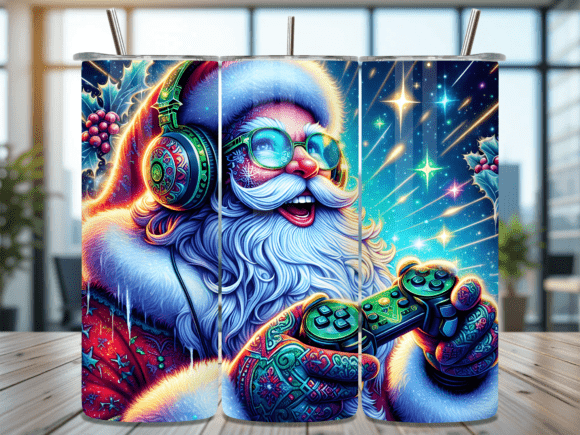
Gaming Santa Headset Tumbler Wrap Design: A Practical Guide for Creators
If you create sublimation tumblers, you know the right design can make or break a finished product. The Gaming Santa Headset Tumbler Wrap Design has become a popular choice for seasonal gifts, holiday markets, and personalized keepsakes. But even the best wrap file can lead to disappointing results if you overlook a few key details. This article walks you through common mistakes, practical fixes, and what you should check before you hit "download" — or before you press that wrap onto a tumbler.
What Makes the Gaming Santa Headset Tumbler Wrap Design Unique
This design combines two popular themes: holiday cheer and gaming culture. Santa wearing a gaming headset appeals to a wide audience — from young adults who grew up with consoles to parents who want a fun, modern twist on traditional Christmas decor. The wrap set includes two PNG files, one for straight tumblers and one for tapered tumblers, each sized at 9.3″ x 8.2″ with 300 dpi resolution. That means no resizing, no guesswork, and no wasted time.
But having the right files is only part of the equation. Many creators run into issues that are entirely avoidable, and understanding them will save you materials, time, and frustration.
Mistake 1: Choosing the Wrong Tumbler Shape for the File
This might sound basic, but it's the most common error. The Gaming Santa Headset Tumbler Wrap Design comes with two separate files: one for straight tumblers and one for tapered tumblers. If you use the straight file on a tapered tumbler, the design will stretch or distort. If you use the tapered file on a straight tumbler, the wrap may not cover the full height evenly, leaving gaps or overlapping at the seam.
How to avoid it: Before you open the file, measure your tumbler. Most standard 20 oz tumblers are either straight-walled (cylindrical) or tapered (wider at the top, narrower at the bottom). Check the product listing or your tumbler supplier's specs. Then match the correct PNG file to your tumbler type. The 9.3″ x 8.2″ dimensions are designed to fit a 20 oz tumbler, but always confirm the circumference and height of your blank. A quick measurement saves a ruined wrap.
Mistake 2: Ignoring the Resolution When Resizing
The provided files are 300 dpi at 9.3″ x 8.2″. That's print-ready quality. But some creators open the file, see it's a bit too large or small for their specific tumbler, and manually resize it without checking the resolution. When you downsize a 300 dpi image in your design software, the resolution stays high. But if you upsize it — even by 10% — you risk pixelation, soft edges, and a blurry final print.
Better approach: Use the file as-is for a standard 20 oz tumbler. If you need a different size, create a new document at the exact dimensions you need and place the original PNG into it without scaling. Alternatively, work with a vector-based program or use a template that matches your tumbler exactly. The designers of this wrap set have already done the sizing work for you. Trust the dimensions and avoid unnecessary adjustments.
Mistake 3: Neglecting Surface Preparation Before Pressing
Even a premium PNG file can't fix poor application technique. One overlooked detail is surface cleanliness. Sublimation requires a clean, oil-free surface for the ink to transfer properly. Fingerprints, dust, or residue from manufacturing can create ghosting, patchy colors, or adhesion failure.
Practical advice: Before you apply the wrap, clean the tumbler with isopropyl alcohol (at least 70%) and a lint-free cloth. Let it dry completely. Then handle the tumbler with gloves or clean hands. This step is simple, fast, and dramatically improves transfer consistency. Many experienced sublimators also pre-press the tumbler for 10–15 seconds to remove any residual moisture, then wipe it again. That extra minute ensures your Gaming Santa design comes out vibrant and sharp.
Mistake 4: Misunderstanding the Digital Download
Because this product is an instant digital download, beginners sometimes expect a physical item to arrive in the mail. When they receive only PNG files, they may feel confused or shortchanged. The product description clearly states "no physical product will be shipped," but in the excitement of creating, that detail can be overlooked.
What to do instead: Treat the download as a high-quality asset, not the final product. After purchasing, save the files to a dedicated folder on your computer or cloud storage. Unzip the folder if needed, and open the files in your design or sublimation software. You'll have two PNG files — label them clearly (e.g., "straight" and "tapered") so you don't mix them up later. If you're new to sublimation, watch a tutorial on how to load the design into your software and set the correct print settings (mirror image, high quality, color profile). The download is the beginning of your creation process, not the end.
Mistake 5: Assuming All Wraps Are Seamless
Some tumblers have a visible overlap where the wrap meets, especially if the design isn't perfectly scaled or if the wrap is applied slightly off-center. The Gaming Santa Headset Tumbler Wrap Design is described as a seamless wrap, which means the pattern or background continues without an obvious break when applied correctly. But "seamless" depends on precise alignment during application.
How to get a seamless result: Use alignment marks or tape guides on your tumbler before pressing. Measure the circumference of your tumbler and confirm that the wrap's width (9.3″) covers it fully. If your tumbler has a circumference smaller than the wrap, trim the excess carefully so the design meets edge-to-edge. Some creators apply a thin strip of heat-resistant tape along the seam to hold the paper in place during pressing. This prevents shifting that could create a visible line. Also, consider using a silicone wrap or a heat press designed for tumblers to ensure even pressure around the entire surface.
Mistake 6: Not Testing a Sample Print First
It's tempting to load the PNG file, print it on sublimation paper, and press it directly onto a tumbler. But if your printer settings are off, you could waste paper, ink, and a tumbler blank. Common issues include incorrect color profiles, mirror image not enabled, or resolution dropping due to scaling in the print dialog.
A better workflow: Print a small test square of the design on sublimation paper — just a section with the key colors and details. Transfer that test onto a scrap piece of fabric or a sample tumbler. Check the color accuracy, sharpness, and alignment. Adjust your printer settings (such as turning off color management or selecting the correct ICC profile for your paper and ink) before printing the full wrap. This test takes five minutes and prevents a lot of regret. With the Gaming Santa design, you want the reds, greens, and headset details to pop clearly — a test print lets you dial that in.
What to Check Before You Buy or Download
Before you commit to any tumbler wrap design, here's a short checklist that applies specifically to this product and similar digital files:
- File format: PNG is widely compatible with sublimation software, but confirm your program accepts it. PNG files preserve transparency and high resolution, which is ideal for wraps.
- Dimensions: 9.3″ x 8.2″ fits most standard 20 oz tumblers. If your tumbler is a different size, you may need to adjust or choose a different wrap. Measure first.
- Resolution: 300 dpi is the industry standard for sharp sublimation prints. Any lower, and you risk blurry results. This wrap meets that standard.
- Included variations: You get both straight and tapered versions. If only one were included, you'd have to adapt manually — which rarely works well. Having both saves time and reduces error.
- Design theme: Gaming Santa with a headset is a niche but growing trend. Consider your audience: gamers, parents, teens, or anyone who appreciates a playful holiday twist. If your customer base leans traditional, this might still work as a fun alternative gift.
Practical Advice for Better Results
Beyond avoiding mistakes, there are a few habits that will elevate your finished tumblers:
- Use a quality sublimation printer with dedicated sublimation ink. Don't use standard inkjet ink — it won't transfer properly.
- Choose the right paper. High-release sublimation paper helps colors stay vibrant and reduces ghosting.
- Press at the correct temperature and time. For most tumblers, 385–400°F for 60–90 seconds works well, but follow your equipment's guidelines.
- Allow the tumbler to cool completely before handling. Hot sublimation ink is still mobile — cooling locks the design in place.
- Inspect the finished wrap. Look for light spots, scratches, or blurry areas. If something is off, note the issue and adjust your process next time.
Final Thoughts
The Gaming Santa Headset Tumbler Wrap Design is a well-made digital product that saves you time and guesswork — provided you use it correctly. The two PNG files, straight and tapered, cover the most common tumbler shapes. The dimensions and resolution are optimized for a 20 oz blank. But even the best design can't compensate for poor application, incorrect tumbler selection, or skipped preparation steps.
By measuring your tumbler, cleaning the surface, testing a print, and trusting the original file dimensions, you'll get professional-looking results that customers will love. Whether you're creating for holiday markets, Etsy shops, or personal gifts, this design offers a unique blend of gaming culture and Christmas cheer — and with a little care, it will look just as good on the finished tumbler as it does on the screen.